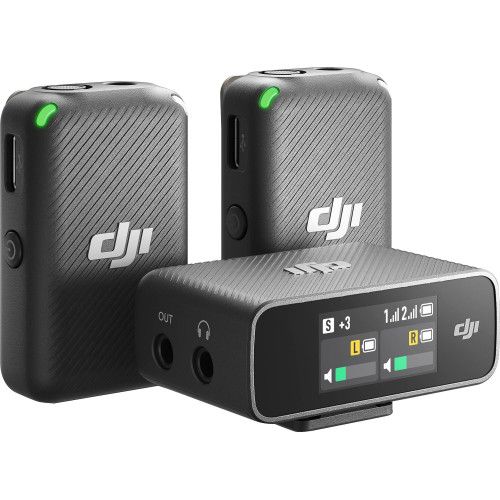
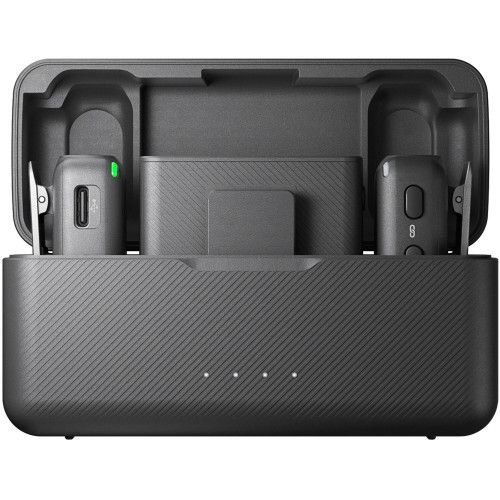
Are you looking to rent a DJI Mic wireless microphone in Da Nang? The DJI Mic (first generation) is a wireless lavalier microphone system featuring 2 transmitters, 1 receiver, and a charging case. Each transmitter includes internal storage for backup recording, a transmission range of up to 250m, and the receiver features a touchscreen with direct connectivity to both cameras and smartphones. It is a reliable, easy-to-use choice for interviews, vlogs, and event filming. At Đà Thành Camera, the rental rate is 300.000đ/day or 210.000đ/half-day session.
What is the DJI Mic wireless microphone used for?
- Two-person interviews: one transmitter per person, recording on separate channels.
- Vlogging, YouTube shoots: significantly clearer vocal audio than built-in camera mics.
- Event and conference filming: long transmission range allows placing the camera at the back of the hall.
- Smartphone livestreaming: connect the receiver via USB-C or Lightning adapters.
- Lecture recording: clip onto the instructor's collar to maintain consistent volume throughout the session.
DJI Mic Technical Specifications
- Configuration: 2 transmitters (TX) + 1 receiver (RX) + charging case
- Internal recording: 8GB internal storage per transmitter
- Transmission range: approx. 250m line-of-sight
- Receiver: touchscreen, 3.5mm output, USB-C
- Smartphone connectivity: USB-C and Lightning adapters
- Modes: Mono, Stereo (one channel per speaker)
- Battery life: transmitters and receiver approx. 5.5 hours; extra power from charging case
- Mounting: lapel clip and magnet
How to connect the DJI Mic to a camera
Quick steps for camera setups:
- Mount the receiver on the hot shoe and connect the 3.5mm cable to the MIC port.
- Set low audio input levels on the camera, then adjust gain on the receiver.
- Plug headphones into the camera/receiver to monitor audio before recording.
- Recommended cameras: Sony A6400 camera, Sony ZV-E10 camera.
The DJI Mic rental kit includes
- 02 Transmitters (TX)
- 01 Receiver (RX)
- 01 Charging case
- Windscreen deadcats
- 3.5mm TRS camera cable
- USB-C and Lightning smartphone adapters
- Charging cable
- Carrying pouch
How to check audio before filming
- Fully charge, power on, and verify pairing indicators between units.
- When connecting to a camera, plug the cable into the correct MIC port, not the headphone jack.
- Lower in-camera recording levels and adjust gain primarily on the receiver unit.
- Wear headphones, test speaking at normal and peak volumes, ensuring there is no distortion or clipping.
- Record a 10-second test clip and play it back before official shooting.
Who should rent the DJI Mic wireless microphone?
- Great for: creators filming interviews, vlogs, and events needing reliable wireless audio with backup recordings.
- Great for: users looking for a lower rental price than the DJI Mic 2.
- Consider: if shooting in noisy environments, the DJI Mic 2 with active noise canceling will perform better.
Tips for best results with the DJI Mic
- Enable internal transmitter recording during crucial scenes for a safety backup audio file.
- Select Stereo mode during 2-person interviews for independent audio track editing.
- Keep camera gain low and adjust main levels on the receiver to prevent distortion.
- Attach furry windscreens when shooting outdoors.
- Return transmitters to the charging case during breaks between takes.
Frequently asked questions when renting the DJI Mic
How much does it cost to rent a DJI Mic wireless microphone in Da Nang?
At Đà Thành Camera, the rental rate is 300.000đ/day or 210.000đ/half-day session. Better rates are available for multi-day rentals or bundled camera gear; call 0345.878.879 for a quote.
How does the first-gen DJI Mic differ from the DJI Mic 2?
The DJI Mic 2 features 32-bit float recording, active noise canceling, and a 3.5mm mic input on the transmitter; the original DJI Mic has a lower rental price.
Can the DJI Mic be used with smartphones?
Yes, simply plug the receiver using the included USB-C or Lightning adapters.
Does the DJI Mic have noise cancellation?
It does not feature active noise cancellation like the newer model; place the mic close to the mouth and use furry windscreens outdoors.
Rent the DJI Mic wireless microphone at Đà Thành Camera Da Nang
All equipment is cleaned, fully charged, and audio-tested prior to handover. Upon pickup, you should test-pair it with your camera or smartphone, use headphones to check for clear, distortion-free sound. Contact 0345.878.879 or visit 132 Nguyễn Đức Trung, Thanh Khê, Đà Nẵng to book. Check out more microphones and audio recorders for rent, or bundle with gimbals and cameras.