
SmallRig

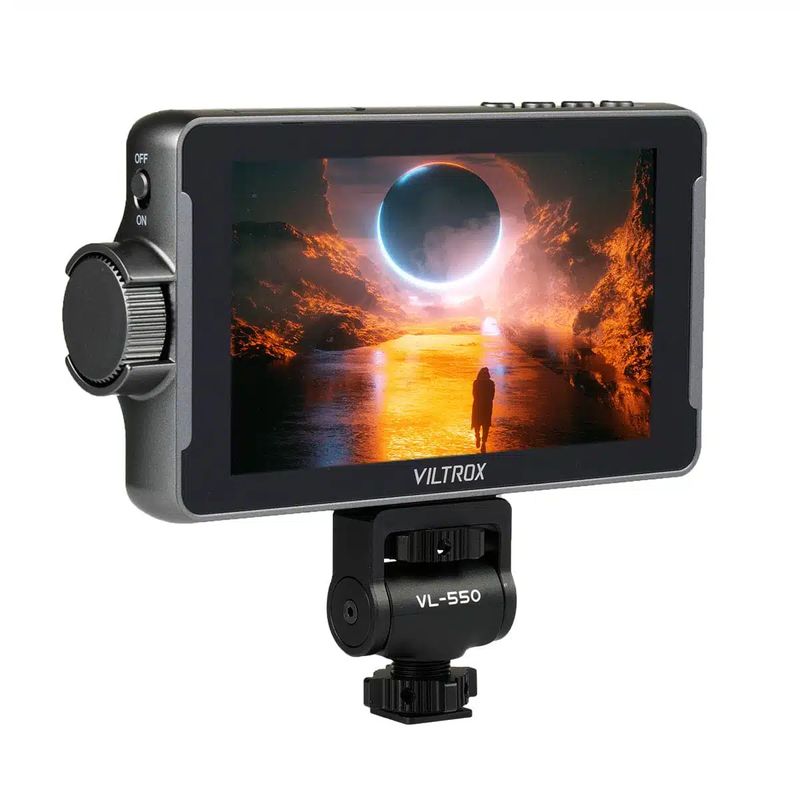
Viltrox DC-550 Pro Monitor

Key specs

  • 5.5-inch Full HD
  • 1200 nits brightness
  • 4K30 HDMI input and output
  • 3D LUT
  • NP-F battery, USB-C power

Rental price

350,000 VND/day

245,000 VND/session

Number of days
1
Subtotal (1 day)350,000 VND

Simple rental process

  • What to bring

    Your passport (or Vietnamese ID card) and a security deposit that depends on the gear.
  • Pickup & return

    Open 7:30 – 22:30 every day; pick up and return at times that suit you.

  • Pickup address

    132 Nguyễn Đức Trung - Thanh Khê - TP. Đà Nẵng Get directions →

  • Payment

    Pay at least 30% when you pick up. A half-day session costs 70% of the daily rate.

Read our rental policy →

Viltrox DC-550 Pro Monitor – full details

Looking to rent a Viltrox DC-550 Pro monitor in Da Nang? The Viltrox DC-550 Pro is a 5.5-inch Full HD monitor with a 1200-nit brightness, ensuring clear visibility even under direct sunlight. It supports 4K30 HDMI input and output, Rec.709 3D LUTs, and runs on either an NP-F battery or USB-C power, making it compact and lightweight to mount on cameras or gimbal rigs. At Đà Thành Camera, the rental price is 350.000đ/day or 245.000đ/half-day session.

Thuê màn hình monitor Viltrox DC-550 Pro tại Đà Nẵng

What is the Viltrox DC-550 Pro monitor used for?

  • Outdoor shooting: 1200 nits brightness for clear viewing.
  • Gimbal setups: Compact and lightweight.
  • Log shooting: LUT monitoring.
  • Focus pulling: Zoom and peaking functions.
  • Vlogging: Larger display than built-in camera screens.

Viltrox DC-550 Pro Specifications

  • Size: 5.5 inches
  • Resolution: 1920x1080
  • Brightness: 1200 nits
  • Contrast: 1000:1, 178° viewing angle
  • Ports: HDMI 1.4 in and out, 4K30
  • Battery: NP-F550 to F970
  • Power: DC 12–18V or USB-C
  • Dimensions: 165 x 91 x 28.5mm

Built-in camera screens are often small, making focus checking difficult and prone to glare outdoors. An external monitor like the Viltrox DC-550 Pro is larger and clearer, helping you check focus and exposure accurately, especially when the camera is mounted on a gimbal, held high, or positioned low. It also allows directors or clients to view the shot simultaneously.
Màn hình monitor Viltrox DC-550 Pro cho thuê – Đà Thành Camera

Assistance Tools on the Viltrox DC-550 Pro Monitor

An external monitor is not only larger but also includes tools to help ensure precise shooting:

  • Focus peaking: highlights in-focus areas in color, making manual focusing effortless.
  • False color and histogram: check exposure to avoid blown-out highlights or lost shadow details.
  • LUT support: preview Log footage with correct colors in real time.

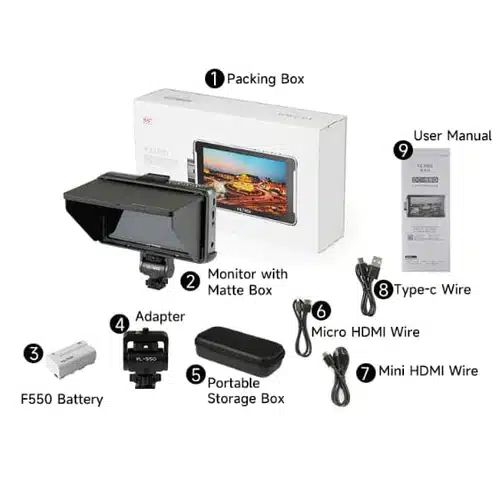
What is Included in the Viltrox DC-550 Pro Rental Kit

  • 01 Viltrox DC-550 Pro monitor
  • 01 hot shoe mount
  • 01 carrying pouch

How to Set Up the Viltrox DC-550 Pro Monitor

  1. Attach an NP-F battery or connect power to the monitor.
  2. Mount the monitor to the camera using a magic arm or hot shoe mount.
  3. Connect an HDMI or SDI cable from the camera to the monitor.
  4. Select your LUT, and enable peaking or false color if needed.
  5. Adjust monitor brightness to match shooting conditions.

Where is the Best Place to Mount the Monitor?

The mounting position depends on your shooting style:

  • On the camera hot shoe: convenient for handheld shooting and vlogging.
  • On a magic arm or gimbal handle: easy to view when holding the camera high.
  • On a dedicated director's stand: paired with a wireless video transmitter.

Who Should Rent the Viltrox DC-550 Pro Monitor?

  • Great for: outdoor shooting and gimbal work.
  • Great for: users needing a compact monitor.
  • Great for: gimbal users, such as those using the gimbal DJI RS 4 Pro, who need a bright, lightweight monitor mounted on the handle.
  • Consider alternatives if: you specifically require SDI ports.

Tips for Using the Viltrox DC-550 Pro Monitor Effectively

  • Fully charge your NP-F batteries, and rent extra batteries for full-day shoots.
  • Use a magic arm to adjust the monitor angle flexibly.
  • Enable focus peaking when pulling focus manually.
  • Use false color to check skin tone exposure.
  • Use a sun hood when shooting at midday.
  • When shooting outdoors, increase monitor brightness and use a DIY sun hood made from black cardboard if necessary for clearer visibility.
  • Position the monitor so both you and the director can view it, or use a wireless transmitter for a secondary monitor.

Frequently Asked Questions About Renting the Viltrox DC-550 Pro Monitor

How much does it cost to rent the Viltrox DC-550 Pro monitor in Da Nang?

At Đà Thành Camera, the rental price is 350.000đ/day or 245.000đ/half-day session. Better rates are available for multi-day rentals or package deals with other gear; call 0345.878.879 for a quote.

Is it bright enough for direct sunlight?

Yes, 1200 nits provides great outdoor visibility.

What batteries does it use?

NP-F batteries such as the pin NP-F970.

Are there larger monitor options available?

Yes, the 7-inch màn hình Portkeys HS7T II.

Rent the Viltrox DC-550 Pro Monitor at Đà Thành Camera Da Nang

All equipment is cleaned, tested for functionality, and checked for complete accessories before handover. Upon pickup, we recommend testing the monitor with your camera or lights and following the setup steps above. Contact us at 0345.878.879 or visit 132 Nguyễn Đức Trung, Thanh Khê, Đà Nẵng to reserve your gear. Browse more phụ kiện quay phim cho thuê, or bundle your rental with phụ kiện quay phim and máy ảnh, máy quay.